This page describes various projects that I’ve used Python to code. They were a great reason to learn Python and experience a small subset of the capability available through the language’s user created packages and community support.
- Nand2Tetris
- Fitness Dashboard
- Scrape data from PDF Credit Card Statements
- Get Helium Mining Transactions
Nand2Tetris
Nand2Tetris is a hands-on computer science course, guiding learners to create a basic computer which is capable of running programs written in a high level programming language – from the ground up.
Click here for the Nand2Tetris project page
Fitness Dashboard
As a fitness enthusiast, I like tracking, filtering, and displaying performance data. Using a database of performance on various weight lifting movements, I created a dashboard to view performance over time. Using Dash, a dashboard was created which is displayed in a web browser and includes interactive elements that help filter and select the data to display.
Aside: Some of the motivation for this project came from my dissatisfaction with Excel’s Pivot Charts (including bugs, slow performance, and inflexibility).
A screenshot below shows two charts. The top chart “Performance (# of Reps) shows number of repetitions performed in a set, and the bottom (Volume (# of Sets) shows the number of sets performed for that muscle group per week.
The user first selects a muscle group from the Muscle Group radio button selection. This updates the Lift Name radio button selections to only show lifts for that muscle group.
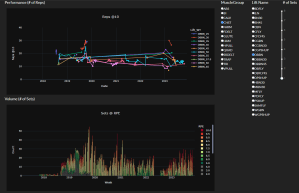
In the Performance chart, the data series are created from the original data set by selecting the Lift Name from the radio button selection to the right. A series is created for each weight that lift was performed at, whose display name is “[lift name]_[weight]”.
Behind the scenes, the script imports the raw data from Excel file using Pandas. However, since this operation is slow, the first time the script is run it will save the imported data to a Pickle file. On future runs, the Excel sheet date is compared to the Pickle file, and only reads the Excel file if the Pickle file is out of date.
Then, the raw data is sanitized and data types are converted where necessary. From there, other functions filter the raw data using Pandas based on input from the Dash radio button components. The layout on screen is created using both Dash and Dash Bootstrap Components.
Scrape data from PDF Credit Card Statements
This script processed all the PDF’s in a given folder to extract the text, then post process the text to get transactions of interest. The package “pdftotext” did most of the heavily lifting here,
Get Helium Mining Transactions
This script interacted with a web based tool for getting transactions from the Cryptocurrency Helium. The script opens a instance of Chrome using the package “selenium”.
After the script browses to a website and fills in my account info it clicks a “go” button on the webpage. The web based tool then downloads a file, which the Python script then opens and post processes the data using Pandas.
 Ethan's Projects